Listeners
Listeners are a top-level primitive in Plano that bind network traffic to the dataplane. They simplify the configuration required to accept incoming connections from downstream clients (edge) and to expose a unified egress endpoint for calls from your applications to upstream LLMs.
Plano builds on Envoy’s Listener subsystem to streamline connection management for developers. It hides most of Envoy’s complexity behind sensible defaults and a focused configuration surface, so you can bind listeners without deep knowledge of Envoy’s configuration model while still getting secure, reliable, and performant connections.
Listeners are modular building blocks: you can configure only inbound listeners (for edge proxying and guardrails), only outbound/model-proxy listeners (for LLM routing from your services), or both together. This lets you fit Plano cleanly into existing architectures, whether you need it at the edge, behind the firewall, or across the full request path.
Network Topology
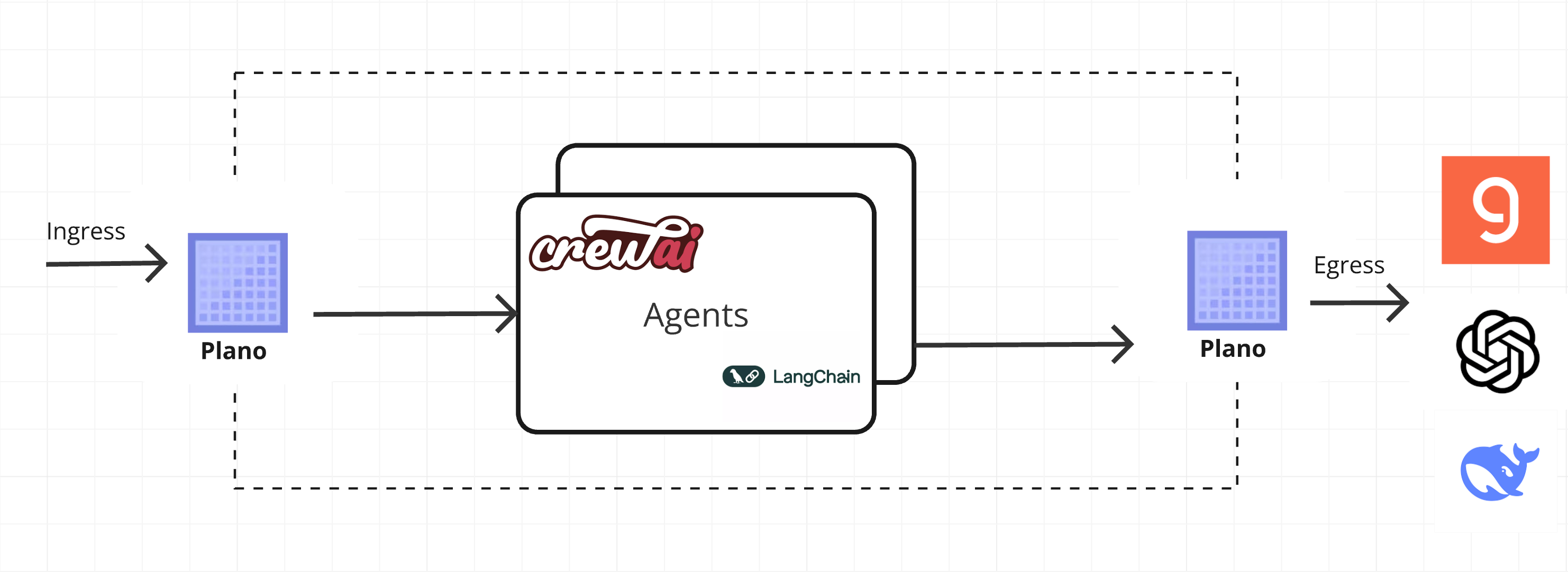
The diagram below shows how inbound and outbound traffic flow through Plano and how listeners relate to agents, prompt targets, and upstream LLMs:
Inbound (Agent & Prompt Target)
Developers configure inbound listeners to accept connections from clients such as web frontends, backend services, or other gateways. An inbound listener acts as the primary entry point for prompt traffic, handling initial connection setup, TLS termination, guardrails, and forwarding incoming traffic to the appropriate prompt targets or agents.
There are two primary types of inbound connections exposed via listeners:
Agent Inbound (Edge): Clients (web/mobile apps or other services) connect to Plano, send prompts, and receive responses. This is typically your public/edge listener where Plano applies guardrails, routing, and orchestration before returning results to the caller.
Prompt Target Inbound (Edge): Your application server calls Plano’s internal listener targeting prompt targets that can invoke tools and LLMs directly on its behalf.
Inbound listeners are where you attach Filter Chains so that safety and context-building happen consistently at the edge.
Outbound (Model Proxy & Egress)
Plano also exposes an egress listener that your applications call when sending requests to upstream LLM providers
or self-hosted models. From your application’s perspective this looks like a single OpenAI-compatible HTTP endpoint
(for example, http://127.0.0.1:12000/v1), while Plano handles provider selection, retries, and failover behind
the scenes.
Under the hood, Plano opens outbound HTTP(S) connections to upstream LLM providers using its unified API surface and smart model routing. For more details on how Plano talks to models and how providers are configured, see LLM providers.
Model listeners also support Filter Chains. By adding a filter_chain to a model listener
you can run input guardrails, content-safety checks, or other preprocessing on direct LLM requests before they reach
the upstream provider — without requiring an agent layer.
Configure Listeners
Listeners are configured via the listeners block in your Plano configuration. You can define one or more inbound
listeners (for example, type:edge) or one or more outbound/model listeners (for example, type:model), or both
in the same deployment.
To configure an inbound (edge) listener, add a listeners block to your configuration file and define at least one
listener with address, port, and protocol details:
 1version: v0.2.0
 2
 3listeners:
 4  ingress_traffic:
 5    address: 0.0.0.0
 6    port: 10000
 7
 8# Centralized way to manage LLMs, manage keys, retry logic, failover and limits in a central way
 9model_providers:
10  - access_key: $OPENAI_API_KEY
11    model: openai/gpt-4o
12    default: true
When you start Plano, you specify a listener address/port that you want to bind downstream. Plano also exposes a
predefined internal listener (127.0.0.1:12000) that you can use to proxy egress calls originating from your
application to LLMs (API-based or hosted) via prompt targets.